1. HWA
  2. Help centre
  3. Subscription and payments
All areas

Subscription and payments

#Where do I see my subscription?

  • Families
  • Web

Open Account. There are three tabs across the top: Subscription, Payment history and Family plan. Subscription has everything of yours: the Plan, the Amount, Current period ends and Next charge.

Account is the part of the product that is about you rather than about an educational centre, which is why it always opens — including when access to everything else is restricted. It is where you go to see why.

#Do I get a free trial?

  • Families
  • Web

If the centre that enrolled you offers one, you get it when you accept the invitation, and Account shows You are on a free trial with the date it ends and the days remaining.

During the trial nothing has been charged and no payment details are needed yet: there is no subscription behind it, so there is nothing to cancel.

It is one trial per person. If you have had one before, or already paid before, or somebody covers you on their plan, another is not given.

#What happens when my free trial ends?

  • Families
  • Web

In the last few days Account warns you: Your free trial ends in {{days}} days. That notice says the important part — nothing is charged automatically, so it will simply stop.

There is no surprise charge and no automatic renewal: if you do not set up a subscription before that date, access to the paid features stops and Account shows Your free trial has ended. You can subscribe afterwards and get your access back.

#How do I subscribe?

  • Families
  • Web

In Account → Subscription, press Set up a subscription. The button shows the price, so you know the amount before you touch it.

We send you to our payment provider's page to choose how to pay and authorise it. Payment happens there, not here: we do not store your card details. When you finish you are returned to the app on your own.

If it says There is nothing on offer in your country yet, we do not sell subscriptions where you are yet.

#I paid, but the app says it is still confirming. What do I do?

  • Families
  • Web

Nothing. Coming back from the provider you will see Confirming your subscription while we check; it usually takes a few seconds and then says You are all set.

If instead you see We have not seen the payment yet, there is still nothing for you to do: some payment methods take longer to settle — a bank transfer or a cash payment can take hours. Your account updates on its own as soon as it comes through.

Do not pay again to "fix" it: that would be a second charge for the same thing.

#Why does it say I am covered by a family plan?

  • Families
  • Web

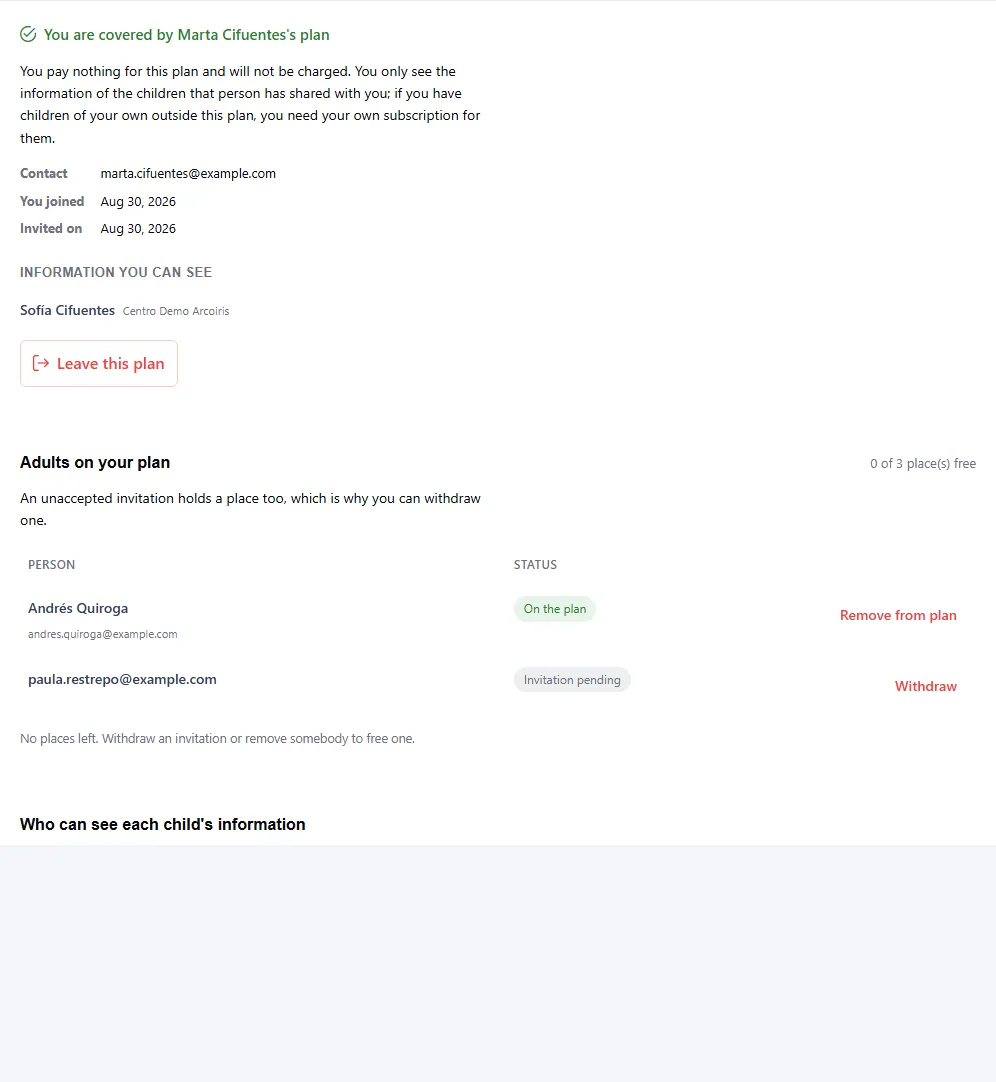
Because somebody invited you onto their subscription. Account shows Covered by a family plan and nothing else: somebody else pays for this plan, so there is nothing here for you to change or cancel.

You also do not see what they pay, how they pay it, or their charge history — that is their information. You pay nothing and are never asked for payment details.

Coverage reaches the children linked to the person who pays. If you have children of your own outside that plan, you need your own subscription for them.

The Family plan tab shows who covers you, their Contact, and under Information you can see the children whose information that person shared with you. If they have not shared any yet it says That person has not shared any child's information with you yet.

#I was told my price is changing. What does that mean?

  • Families
  • Web

It means what the notice in Account says: Your price is changing. It carries the exact date, the new amount and what you pay today — nothing changes before then, and you can cancel at any time.

The change lands on your own billing anniversary rather than the day it is announced, and we email you beforehand. If you do not accept the new rate, you have until that date to leave.

#It says Payment overdue. Have I lost access?

  • Families
  • Web

Not yet. The full status is Payment overdue — your access continues for now, and that is literal: there is a grace period before anything is restricted.

If you pay by card, the provider retries on its own and you need do nothing. If you pay by a method you complete yourself (a bank transfer or a cash payment, say), nobody retries it: it has to be paid.

Your data, and the records an educational centre holds about you or your child, are not deleted for non-payment.

#Can the educational centre see what I pay?

  • Families
  • Schools
  • Web

No. The subscription is between the family and HWA: the educational centre does not see the amount, the payment method, or anybody's charge history.

It does not see who covers whom either. Another family including you on their plan is a relationship between the two of you, not something the centre needs to know.

#How do I create a plan?

  • Schools
  • Web

In Plans, press New plan. It comes before everything else: with no plan there is nothing a family can buy.

Name (Spanish) and Name (English) are both required. The name is not decoration — it is the line the payment provider shows the payer while they decide whether to authorise the charge, so a plan named in one language shows the wrong one to half of them.

Code and Country identify the plan and cannot be changed afterwards. Country lists only countries that are active and have published policies — nobody could subscribe in the others.

You can edit everything until somebody has been sold it. From the first sale, Price, Currency, the cycle and Adults covered are fixed; the names and Offer publicly stay editable.

#How do I configure free trials?

  • Schools
  • Web

In Plans, in the Free trials panel. Default length (days) is what anybody gets on enrolling, and 0 turns trials off for every centre without an override.

If a centre needs a different length it appears under Centres with their own length, along with how many Trials given it has. Use the default removes its override.

The part worth knowing: trials already granted keep their own end date — changing this never moves them. Raising the default does not extend trials in progress, and lowering it does not cut them short.

#How do I change the price of a plan that has already sold?

  • Schools
  • Web

You do not edit it: you retire it and replace it. In Plans, on the plan you want to change, use Retire and replace — create the new plan at the new price first, then choose it under Replace it with.

When you do, the plan stops being offered to new subscribers immediately. Nobody on it is charged differently today. Each subscriber is emailed and moved on their own anniversary, rather than everybody on the same day.

Only plans on the same billing cycle can be chosen. And a successor is always required: retiring a plan without one would leave its subscribers with nowhere to go.

#How do I see who can use the app and who cannot?

  • Schools
  • Web

In People, in the Access column. Each row says why that person has access: Subscription, Free trial, Free with the reason, On someone's plan, or Nothing.

To answer the question directly, filter by Can use it or Cannot use it yet. Read the State column beside it: somebody who has not been invited yet owes nothing, and without that they look a lot like somebody who stopped paying.

#Where do I see the payments I have already made?

  • Families
  • Web

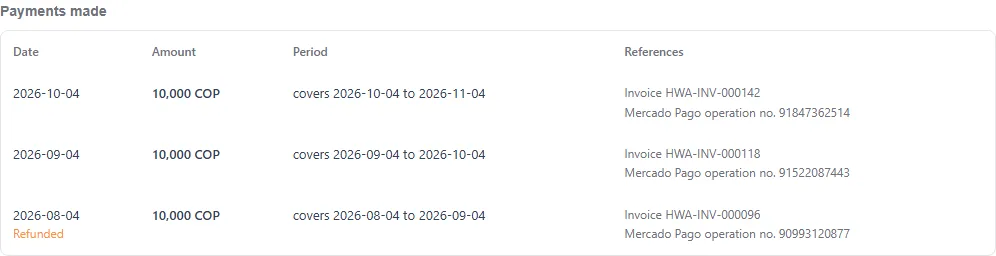
In Account, the Payment history tab. Every charge is listed with its Date, its Amount, the Period it covers and its References.

There are two references and both matter: Invoice is ours and Mercado Pago operation no. is the payment provider's. Either one is enough if you write to support — and if you are holding a Mercado Pago receipt, the number on it is the second one.

A refunded or reversed charge does not vanish from your history: it stays listed with its status, because this is your record of what happened.

If nothing has been charged yet you will see No charges yet.

  • Screenshot: Where do I see the payments I have already made?

#How do I invite somebody onto my plan?

  • Families
  • Web

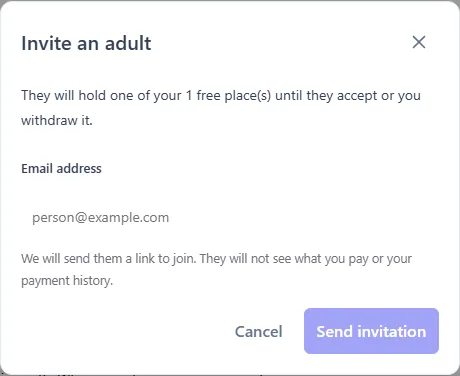
In Account, the Family plan tab, press Invite an adult and type their Email address. One subscription covers three adults in total — you and two others.

We send them a link to join. They will not see what you pay or your payment history.

Two things worth knowing first:

  • An unaccepted invitation already holds a place. That is why you can take it back: under Adults on your plan it shows as pending, with Withdraw beside it.
  • Inviting somebody shows them nothing by itself. Being on your plan gives them access to no child at all. That is decided separately, under Who can see each child's information (P16).

If there are no places left you will see No places left. Withdraw an invitation or remove somebody to free one.

  • Screenshot: How do I invite somebody onto my plan?
  • Screenshot: How do I invite somebody onto my plan?

#How do I decide which children each adult on my plan can see?

  • Families
  • Web

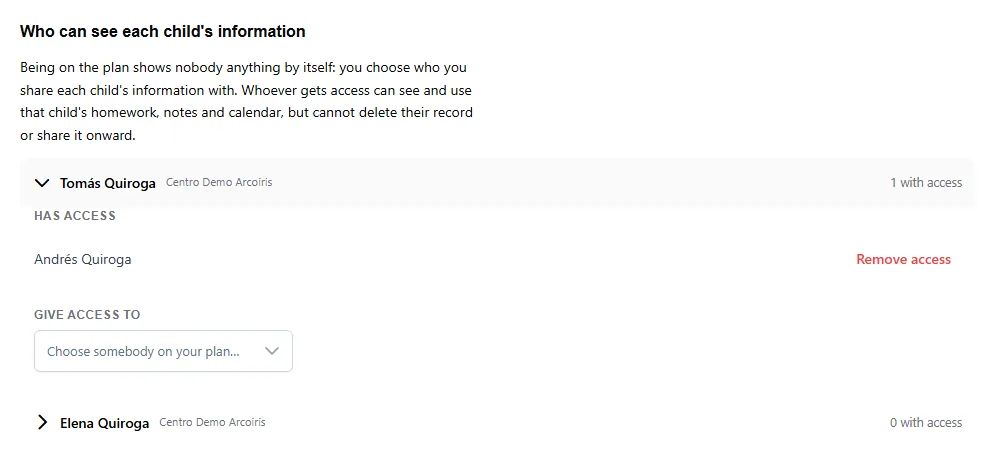
In Family plan, under Who can see each child's information. Open the child and use Give access to to choose somebody on your plan. Has access lists who already has it, and Remove access takes it away.

Being on the plan and having access are different things. Inviting somebody shows them nothing: you choose, child by child, whose information you share.

Whoever gets access can see and use that child's homework, notes and calendar, but cannot delete their record or share it onward with anybody else.

Removing access takes effect immediately and the person stays on your plan — you can give it back whenever you want.

  • Screenshot: How do I decide which children each adult on my plan can see?

#How do I take somebody off my plan?

  • Families
  • Web

Under Adults on your plan, beside that person. There are two different actions depending on where they are:

  • Withdraw — for an invitation they have not accepted. The place is freed immediately and the link we sent stops working. You can invite them again whenever you like.
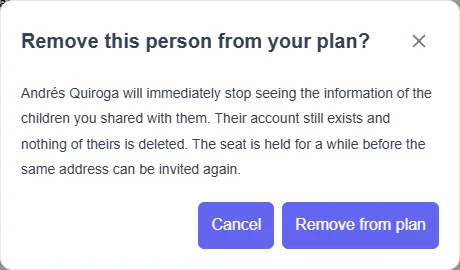
  • Remove from plan — for somebody already on it. They immediately stop seeing the information of the children you shared with them.

Removing somebody deletes nothing of theirs: their account still exists and what is theirs stays. What they lose is access to yours.

After you remove somebody, the place is held for a while before the same address can be invited again.

  • Screenshot: How do I take somebody off my plan?

#Somebody invited me to a family plan. What do I do?

  • Families
  • Web

Open the link from the email exactly as it arrived. If you are not signed in we will ask you first and bring you back to the same place.

It has to be the same address the invitation was sent to. That address is the one thing the person inviting you chose, so a link forwarded to somebody else will not work.

When it finishes you will see You are on that person's plan. From then on: you pay nothing for this plan and will not be charged, and you see the information of the children that person shares with you — which may be none at first, until they decide.

Opening the same link again later does no harm: it takes you to your Family plan. If it says the invitation no longer exists or has expired, ask that person to invite you again.

#Can I leave a family plan myself?

  • Families
  • Web

Yes. In Account, the Family plan tab, press Leave this plan. You do not need the person who invited you to do it.

When you leave you stop being covered by that plan and stop seeing the information they shared with you. Nothing of yours is deleted: your account stays yours and you can start your own subscription whenever you want.

If you want back in, that person has to invite you again — and the place is held for a while before the same address can be used.

  • Screenshot: Can I leave a family plan myself?

#How do I let an organisation use HWA without paying?

  • Schools
  • Web

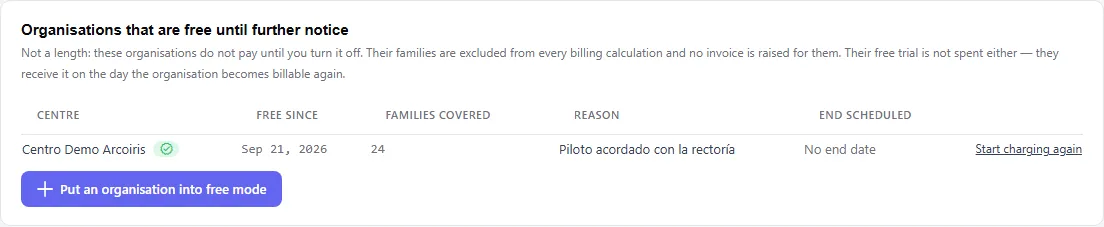
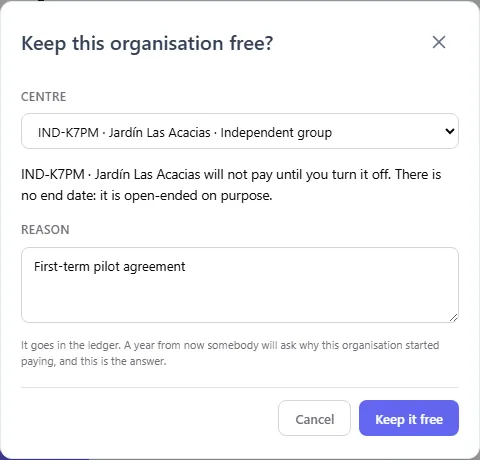
In Plans, under Organisations that are free until further notice, press Put an organisation into free mode, choose the organisation and write the Reason.

It is not a length. The organisation stops paying until you turn it off, with no end date. To end it, use Start charging again on its row.

While it is on, their families are excluded from every billing calculation and no invoice is raised for them. Their free trial is not spent either: they receive it on the day the organisation becomes billable again.

The Reason is not paperwork: it goes in the audit record, and a year from now somebody will ask why this organisation does not pay.

Two organisations can share a name, so the picker also shows what each one is — Verified institution, Independent group — and the page's Country filter narrows the list.

A family already paying for themselves does not stop paying automatically. Their subscription stays theirs and only they can cancel it.

  • Screenshot: How do I let an organisation use HWA without paying?
  • Screenshot: How do I let an organisation use HWA without paying?

Other areas